Any Topic, Not a Fixed Catalog
Library products cover the topics the vendor filmed. You describe what you need and it gets made, including the rare presentation and the question your patients keep asking.
Turn a procedure or a condition into a short, clear video for your patients. Pick a clinical style, pick a language, and get narration and captions in one pass. A clinician reviews it before it goes out.

Sample video. Your result will vary based on the style, voice, and settings you choose.
Every one of these was generated from a single prompt. No camera, no editing.
No editing skills. No complex software. Just describe what you want.
Name the procedure, condition, or treatment. Say who it is for: a first-visit patient, a pre-op patient, or a family member.
The platform writes the script, renders the anatomy in the style you picked, records the narration, and syncs word-level captions.
A qualified professional checks every script line and visual before the video reaches a patient. Then export for your site, your waiting room, or a follow-up email.
The same subject in every style. Pick one and the create form opens on it. A sixth option, Auto, takes its look from your prompt.
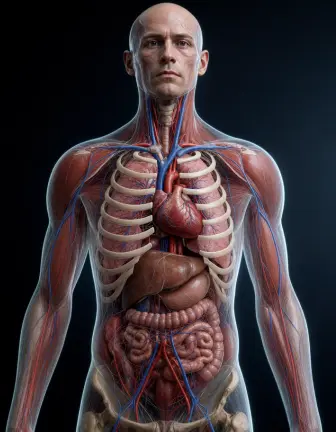 Realistic 3D The textbook render. Best for procedures and organ close-ups.
  Translucent Body A see-through body with the organs glowing inside. Best for whole-body flows.
 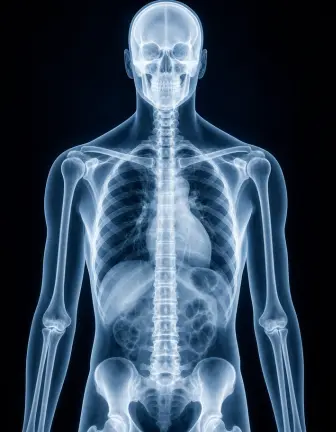 X-Ray Bone-first, high contrast. Best for joints, fractures, and skeletal motion.
 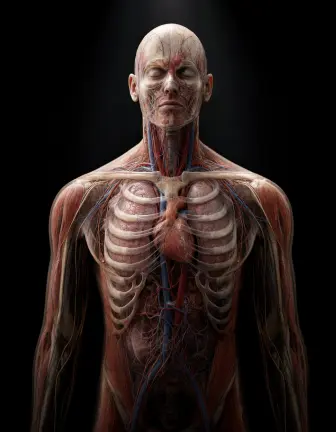 Dark Studio One lit subject on black. Best for a single organ or device on screen.
 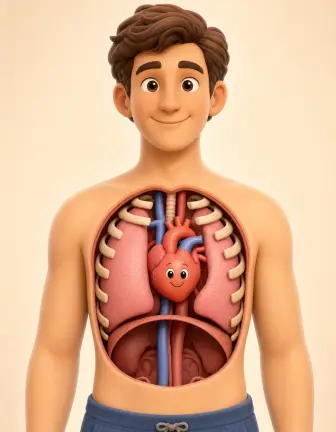 Friendly Cartoon Soft and non-clinical. Best for children, waiting rooms, and first-visit explainers.
 Anatomy is constrained, not imagined. The template holds patient-left against viewer-left, keeps organ landmarks in place, runs one-way flows in one direction, and checks the counts models get wrong: lung lobes, bronchi, fingers. It narrows the gap. It does not close it, so a qualified professional should review any video a patient will see. These videos explain. They are not medical advice.
Professional tools, zero learning curve.
Library products cover the topics the vendor filmed. You describe what you need and it gets made, including the rare presentation and the question your patients keep asking.
A knowledge pack holds patient-left against viewer-left, keeps organ landmarks in place, and checks the counts models get wrong. Generic video tools ask the model to imagine anatomy.
Realistic 3D, Translucent Body, X-Ray, Dark Studio, and Friendly Cartoon. Pick the clinical look for a pre-op brief and the friendly one for a childrens ward.
Record the same explainer for every language your patients speak. No reshoot, no new vendor quote, no waiting on a translation cycle.
Export 16:9 for the waiting room screen and the website, 9:16 for a follow-up message, and 1:1 for social. One topic, three formats.
Waiting room screens usually run muted, and many patients read better than they hear. Captions come out synced without a separate pass.
The output is a draft until a clinician signs it off. Regenerate any scene from an edited prompt rather than reshooting the whole video.
Medical animation costs the same credits as a faceless video here: images from 1 credit per scene, AI video from 5 credits per second, voice at 30 credits per minute.
Most clinics do not have a patient education problem. They have a coverage problem. The leaflet covers the common case. The video library covers the topics the vendor chose to film. The patient in front of you has the other question.
Patient education libraries ship a fixed catalog. One vendor advertises 2,591 videos. Another lists 8,300 leaflets. Those are large numbers until the topic you need is not in them, or until the patient does not read English. Then the catalog is a wall.
AITuber generates the video instead of shelving it. You describe the procedure or the condition, pick one of five clinical styles, and the platform writes the script, builds the visuals, records the narration, and syncs the captions. The anatomy is constrained by a knowledge pack rather than left to the model to imagine. It narrows the gap. It does not close it, so a qualified professional reviews every video before a patient sees it.
Three things, in this order: what is happening, what it means, and what comes next. Most videos fail because they start with the anatomy lecture instead of the patient question.
The research on this is consistent. Videos improve retention over written handouts, and they lower anxiety before a diagnostic procedure. The effect comes from seeing the process, not from the level of detail. A video that shows a colonoscope moving through the colon does more than a paragraph naming each section.
Keep the scope tight. One procedure or one condition per video. If a patient needs to understand both their diagnosis and their surgery, make two videos and send them a day apart. For the anatomy itself, the AI anatomy video generator covers body systems in more depth.
Libraries and generators solve different problems. A library gives you reviewed, finished videos on the day you subscribe. That is real value, and for the twenty most common topics in a specialty it is hard to beat.
The limits show up at the edges. Catalogs are fixed, so a rare presentation or a new device is not in them. Language coverage is limited to what the vendor produced. Nothing is branded to your clinic. And the annual licence continues whether you use twenty videos or two.
A generator inverts all four. Any topic, any language, your branding, and the cost sits with the videos you actually make. The trade is that the output is a draft: a clinician has to review it before a patient sees it, where a library video arrives pre-reviewed. Clinics that run both usually use the library for the common cases and generate the rest.
A script aimed at "patients with atrial fibrillation" turns vague. A script aimed at "a 60-year-old who was told today that they need a pacemaker" stays concrete and gets watched to the end.
Realistic 3D reads as credible for a pre-op brief. Friendly Cartoon lowers fear for children and first visits. The same script in the wrong style can raise anxiety instead of lowering it.
Show what happens during the procedure and what the parts do. Leave the recommendation, the dosage, and the risk weighting to the clinician in the room. That keeps the video educational.
The marginal cost of a second language is one more generation. Clinics that wait usually never do it, and the patients who needed it most are the ones who go without.
A short video that explains a procedure, a condition, or a treatment to a patient in plain language. Clinics use them on the website, on waiting room screens, in pre-op preparation, and in follow-up messages.
No. These videos explain how something works. They are not medical advice, and they do not replace a consultation. Any video that reaches a patient should be reviewed and approved by a qualified professional first.
An anatomy knowledge pack constrains the visuals rather than leaving them to the model. It holds laterality, keeps organ landmarks in place, runs one-way flows in one direction, and checks counts that models commonly get wrong. It narrows the gap. It does not close it, which is why review is required.
A library sells a fixed catalog that a vendor filmed. This generates the video you describe. If your topic is not in the catalog, or your patients speak a language the catalog does not cover, a library cannot help and a generator can.
Yes. Narration is available in many languages, so the same explainer can be produced for every language group your clinic serves. Captions are generated for each version.
Five fixed styles: Realistic 3D, Translucent Body, X-Ray, Dark Studio, and Friendly Cartoon. There is also an Auto option that takes its look from your prompt. Custom styles are not offered on this template, which is what keeps the output consistent.
Up to 20 minutes. Most clinic explainers work best between 60 and 180 seconds. Long enough to cover the process, short enough that a patient in a waiting room finishes it.
Yes. The same video works on a service page, in an ad, and on a waiting room screen. Keep the educational framing and route any treatment decision back to a consultation.
Most license a library or make their own. A library covers the common topics. Making your own covers the rest, in your language and under your brand. Many clinics use both.
Six pages, one template. Each starts the create form on a different look.
New to the format? Start with how to make anatomy videos with AI.
Create videos for other popular niches
Join 86,046+ creators using AITuber to make professional ai patient education video videos with AI.
No credit card required