Friendly Cartoon for Anxious Patients
Dental fear is the reason plans get declined. A soft, non-clinical look explains the same treatment without the imagery that makes people flinch.
Chairside explainers that answer the question before the patient asks it. Describe the treatment, pick a friendly or a clinical look, and get a short video with narration and captions.
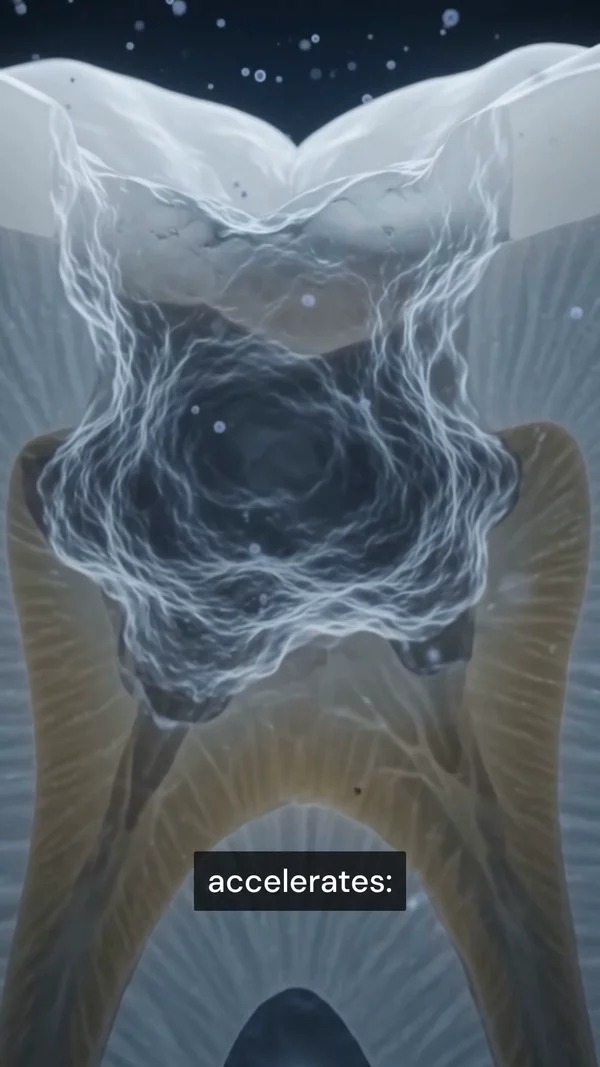
Sample video. Your result will vary based on the style, voice, and settings you choose.
Every one of these was generated from a single prompt. No camera, no editing.
No editing skills. No complex software. Just describe what you want.
Name the procedure or the condition, and say who is watching: a nervous first visit, a parent, or a patient weighing a plan.
The platform writes the script, renders the teeth, gum, and bone in your chosen style, records the narration, and syncs the captions.
A dentist checks the script and visuals before any patient sees it. Then play it chairside, put it on the treatment page, or send it with the plan.
The same subject in every style. Pick one and the create form opens on it. A sixth option, Auto, takes its look from your prompt.
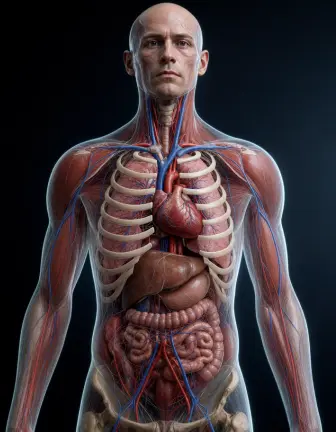 Realistic 3D The textbook render. Best for procedures and organ close-ups.
 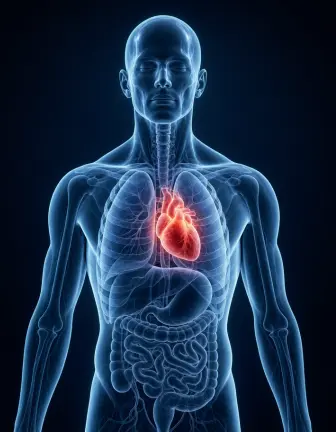 Translucent Body A see-through body with the organs glowing inside. Best for whole-body flows.
 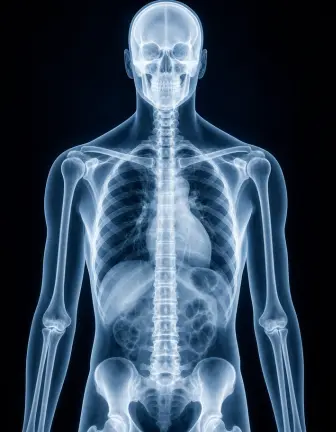 X-Ray Bone-first, high contrast. Best for joints, fractures, and skeletal motion.
 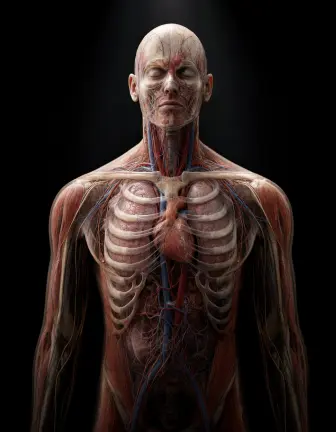 Dark Studio One lit subject on black. Best for a single organ or device on screen.
 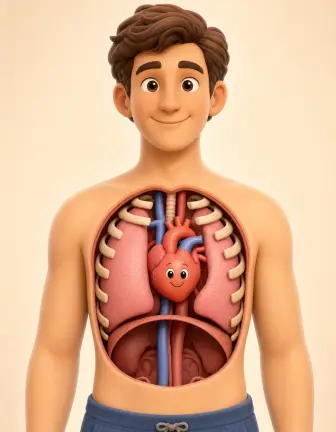 Friendly Cartoon Soft and non-clinical. Best for children, waiting rooms, and first-visit explainers.
 Anatomy is constrained, not imagined. The template holds patient-left against viewer-left, keeps organ landmarks in place, runs one-way flows in one direction, and checks the counts models get wrong: lung lobes, bronchi, fingers. It narrows the gap. It does not close it, so a qualified professional should review any video a patient will see. These videos explain. They are not medical advice.
Professional tools, zero learning curve.
Dental fear is the reason plans get declined. A soft, non-clinical look explains the same treatment without the imagery that makes people flinch.
Realistic 3D, X-Ray, Dark Studio, and Translucent Body are all available. Use X-Ray for bone loss and root position, where the clinical view is the point.
Implants, endodontics, perio, orthodontics, and paediatric topics. If you can describe it, it gets made, including the case a chairside library never filmed.
Explain the same plan in every language your patients speak. Practices in multilingual cities can cover their whole list without hiring a translator.
Export 16:9 for the chairside monitor and treatment pages, 9:16 for Reels and follow-up messages, and 1:1 for the feed.
Patients often watch on a muted phone at home while deciding. Captions carry the explanation without sound.
Generated videos carry your practice name and your look. Library subscriptions ship the same footage to every practice in your city.
Dental treatment plans get declined for one reason more than any other: the patient did not picture what was going to happen. A crown, a graft, and a root canal all sound the same across a counter. They look completely different on a screen.
That is why chairside animation has been sold to practices for twenty years, usually as an annual licence for a fixed library. The library covers the common treatments well. It does not cover the case you are looking at today, it does not speak the language half your patients speak at home, and it carries another practice-shaped brand.
AITuber generates the explainer instead. Describe the treatment, pick Friendly Cartoon for a nervous patient or Realistic 3D for a clinical brief, and the platform writes the script, builds the visuals, records the narration, and syncs the captions. An anatomy knowledge pack constrains the visuals rather than leaving them to the model. Every video should still be reviewed by a qualified professional before a patient sees it.
Patients decline treatment they cannot picture. That is the whole mechanism. A treatment plan is a list of codes and prices, and it reads as a bill rather than as care.
A short animation replaces the abstraction with a sequence. The patient sees the decay reach the pulp, sees the canal cleaned, and sees the crown seated. The price stops being the only concrete thing on the table.
The effect is strongest for treatments with an invisible problem. Bone loss from gum disease is the clearest case: nothing hurts, nothing looks wrong in the mirror, and the X-Ray style shows the bone receding around the root in a way a radiograph on a screen does not.
Start with the two treatments your patients decline most. For most general practices that is a root canal and a crown, or a deep clean for gum disease. Those two videos will pay for the effort faster than anything else on the list.
Then cover one video per treatment page on your website. Six to ten short explainers gives a practice site a complete set, and each one gives the page something to hold a visitor with.
After that, produce the language versions. A practice serving a multilingual area gets more from the same six topics in four languages than from twenty topics in one. For wider medical topics beyond dentistry, use the patient education video generator.
The best dental marketing video teaches first. A short tooth animation that shows a cavity grow gets watched. A clip that only lists your services gets skipped.
Use one explainer in three places. Put it on the treatment page. Post the 9:16 cut to Reels and TikTok. Run the same cut as an ad. One video per treatment gives a practice a month of posts.
Keep the claims simple. Show how the treatment works, then invite the patient to book a consult. For more ideas, see these clinic video marketing examples.
A video that shows what happens if the tooth is left alone does more for case acceptance than one that only shows the crown going on. Show the path, then show the fix.
Friendly Cartoon for children, nervous adults, and first visits. Realistic 3D or X-Ray for patients who are already committed and want the detail. The wrong choice raises anxiety instead of lowering it.
The video runs while the patient is in the chair and the clinician is talking. It supports the conversation. A three-minute film competes with it.
Every treatment page on a practice site converts better with a short explainer on it. That is six to ten videos, which is an afternoon of work here and a five-figure quote from a studio.
A short animated explainer that shows a dental treatment or condition. Practices play them chairside, put them on treatment pages, and send them with plans so patients can see what a procedure involves.
No. These videos explain how a treatment works. They are not advice and they do not replace an examination. A qualified dentist should review any video before a patient sees it.
A subscription licenses a fixed library that a vendor produced, with the same footage going to every practice. This generates the specific explainer you describe, in your language and under your brand, and you pay for the videos you make.
Friendly Cartoon works for anxious patients, children, and first visits. Realistic 3D suits a clinical brief. X-Ray is the strongest choice for bone loss, root position, and impacted teeth, where the clinical view is the explanation.
Yes. Narration is available in many languages with captions for each version, so a practice can cover every language group on its patient list.
Yes. The same explainer works as an ad, on a treatment page, and chairside. Keep the framing educational and route the treatment decision to a consultation.
Between 30 and 60 seconds for chairside. Up to two minutes for a treatment page, where the patient chose to watch. The platform supports up to 20 minutes for training material.
Yes. Free starter credits cover several short explainers, which is enough to make your two most declined treatments and see whether patients respond to them.
Yes. Describe the tooth and what happens to it, such as decay reaching the pulp or a crown being seated. The platform animates the enamel, gum, root, and bone in the style you pick.
The examples on this page are real output from the medical template. They show how a cavity forms, what happens during a root canal, how gum disease reaches the bone, and how an implant is placed. Each one came from a single prompt.
Yes. Export a 9:16 cut for Reels, TikTok, and Shorts, and a 16:9 cut for your website. Keep the video educational and end with an invite to book a consult.
Six pages, one template. Each starts the create form on a different look.
New to the format? Start with how to make anatomy videos with AI.
Create videos for other popular niches
Join 86,046+ creators using AITuber to make professional ai dental animation videos with AI.
No credit card required