The Same Room in Every Frame
Each stage is drawn from the one before it. Windows, doors, and walls stay where they are, so the renovation reads as real work in one space.
Describe a run-down room or house and what it becomes. AI shows the whole renovation from one still camera: the tear-out, the repairs, and the finish, with music and work sounds.
A photo, a drawing, or a render all work. We draw every step between them and keep the camera still. JPG, PNG, or WebP.
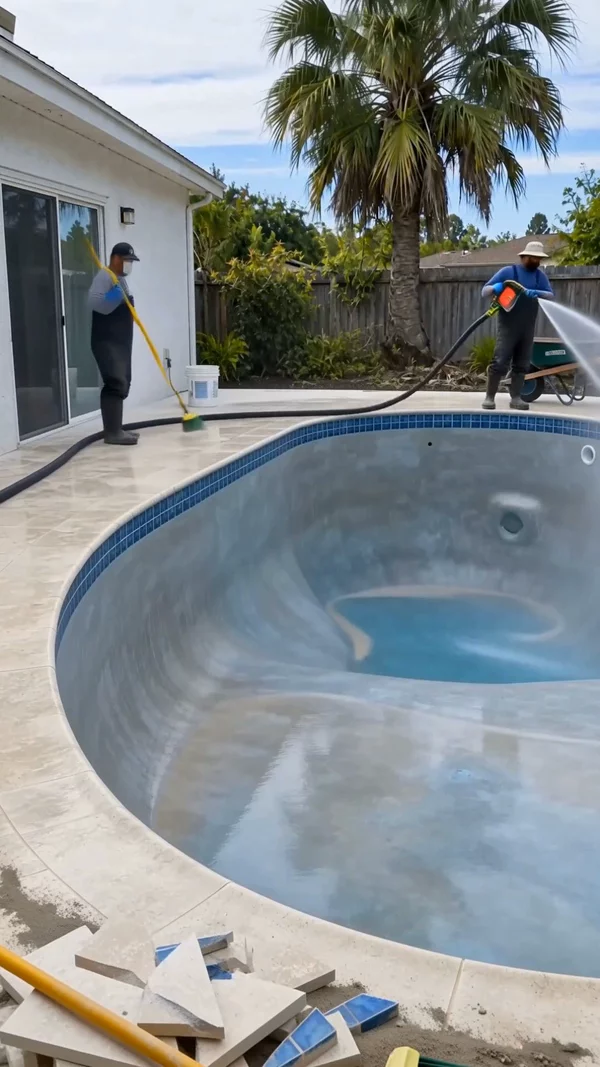
Sample video. Your result depends on your prompt, your photos, and the quality you pick.
Every one of these was generated from a single prompt. No camera, no editing.
No editing skills. No complex software. Just describe what you want.
Say what the place looks like now and after the renovation. Add a photo of a real room as the Before picture if you want.
AI shows the tear-out, the repairs, and the finish from one still camera, then adds music, the sounds of the work, and a lived-in ending.
Download a vertical video for TikTok, Shorts, and Reels, or a wide one for YouTube. Post it from the app to a connected channel.
Professional tools, zero learning curve.
Each stage is drawn from the one before it. Windows, doors, and walls stay where they are, so the renovation reads as real work in one space.
You see the whole job, not just the reveal: old fixtures out, repairs, new surfaces, and the final touches.
The last seconds show the space in use. A family at the new table, a dog on the new lawn. That warmth is what makes renovation videos shareable.
Each clip keeps the sounds of the work, like scraping, drilling, and sweeping, under one music track. No voiceover gets in the way.
Add a photo of a real room, house, or yard as the first frame. AI keeps your angle and renovates what is in the picture.
Kitchens, bathrooms, garages, living rooms, whole houses, porches, and gardens all work. Any single place that changes.
Pick 15 to 60 seconds in 9:16 vertical. It is the right shape and length for the renovation feed on TikTok, Shorts, and Reels.
Real renovation channels film for months. You can post a new renovation every day from a prompt.
An AI renovation video shows an old, worn place becoming new again. A moldy bathroom turns into a spa. An abandoned house gets its porch back. A weedy yard becomes a garden. The camera stays still the whole time, so you watch the tear-out, the repairs, and the finish happen in one frame.
Renovation and restoration videos are one of the biggest satisfying niches on TikTok, YouTube Shorts, and Reels. People love to see something broken made whole. Real renovation channels need a crew, a house, and months of filming. AI renovation channels need a prompt. That is why many new channels in this niche use AI.
AITuber makes the full video from one sentence. Describe the old place and what it looks like after. AI plans the stages, draws each one from the same camera angle, and animates the work between them. You get music, the sounds of the work, and an ending with people enjoying the new space. You can also start from a photo of a real room to see how it could look.
Most of them chain several tools. They write the prompts in a chatbot, draw a before, a middle, and an after picture in an image tool, animate each pair in a video tool, and join the clips in an editor with music.
The hard part is keeping the room the same in every picture. If the window moves or the walls change color between stages, the video looks fake. AITuber draws every stage from the one before it, so the room stays the same room.
That makes it fast to post often. Write one prompt per video, pick a length, and generate. For new building from an empty lot rather than repairs, use the AI construction timelapse generator.
Yes. Open Reference Images and add a photo of your room as the Before picture. Then describe the finish you want. The video starts from your real room and shows it being renovated into the result you described.
It is a quick way to picture a remodel before you spend money on it. Keep in mind that the result is an AI picture of one possible design, not a plan or a quote.
If you already have a real before and after photo from a finished job, the AI before and after video maker page shows how to turn them into a video.
Broken cabinets, cracked tiles, peeling paint, weeds up to the windows. The worse the start, the more satisfying the finish.
The camera never moves, so the whole job must happen in one frame. Pick one room or one view of the house, not a walk-through.
White cabinets, oak floors, a walk-in shower, a cedar deck. Named materials give each stage a clear target and make the result look real.
Pick one lane, like abandoned houses, tiny bathrooms, or backyard makeovers. A clear theme helps the feed show your videos to the same fans again.
It is a short video that shows an old or run-down place being renovated, made by AI from a prompt. The camera stays still while the place goes from worn out to new. It ends with people using the finished space.
A renovation video repairs and restores something that already exists, like an old kitchen or an abandoned house. A construction timelapse builds something new on an empty site. Both use the same tool, so pick the prompt that fits your idea.
Yes. Open Reference Images and add the photo as the Before picture. It becomes the first frame, and AI keeps the same camera angle. Then describe how it should look when the work is done.
Single spaces with a big visual change: kitchens, bathrooms, garages, porches, living rooms, and yards. Abandoned houses and overgrown gardens are popular because the before looks so bad.
No. Renovation videos here have no voiceover and no captions. You get background music and the sounds of the work, which is the style the renovation niche uses.
From 15 seconds to 1 minute. For TikTok, Shorts, and Reels, 20 to 40 seconds is a good range, because the reveal comes before people scroll away.
Yes. Many faceless channels post AI renovation videos on Shorts, TikTok, and Reels. Pick one theme, post often, and keep your prompts varied so each video shows a different space. Follow each platform's rules on labeling AI content.
Video costs 8 credits per second on Basic, 13 on Good, and 15 on Premium. Each still that AI draws adds 10 credits, and photos you upload are free. The app shows the total before you generate.
No. It is an AI picture of one possible result, made to look good on video. Use it for content or to picture an idea, and ask a professional for real plans and prices.
Create videos for other popular niches
Join 75,059+ creators using AITuber to make professional renovation videos with AI.
No credit card required