YouTube Shorts Not Getting Views? 8 Checks
Shorts stuck at low views? Run these eight checks in order, from engaged views and swipe rate to originality, with fixes you can test this week.

Most Shorts that get no views lose the viewer in the first two seconds. Open YouTube Analytics and check two numbers before anything else: engaged views, and viewed versus swiped away. Those two tell you whether the problem is the hook, the idea, or something outside your control.
A view count alone cannot tell you much in 2026. YouTube changed what a view means in August, and it changed which Shorts channels get reach in October. Both changes shift how you should read a slow Short.
The eight checks below run from most likely to least likely. Stop at the first one that fits.
1. Give it more than a day
A Short with few views after six hours is not a failed Short. YouTube’s Todd Beaupré, who leads growth and discovery, said in a September interview that creators focus too much on the first hours. He said many videos get most of their views a month or more after upload.
Shorts move faster than long videos, but the same idea holds. Metricool’s 2026 study of 799,718 videos found that 83% of interactions came in the first ten days. So give a Short at least three days before you judge it, and ten before you write it off.
A Short stuck at zero for a full day is different. Jump to check 6.
2. Read engaged views, not the public count
Since August 24, a public view counts the moment a Short starts to play. A swipe past it still counts. TeamYouTube explains this in its post on view counting.
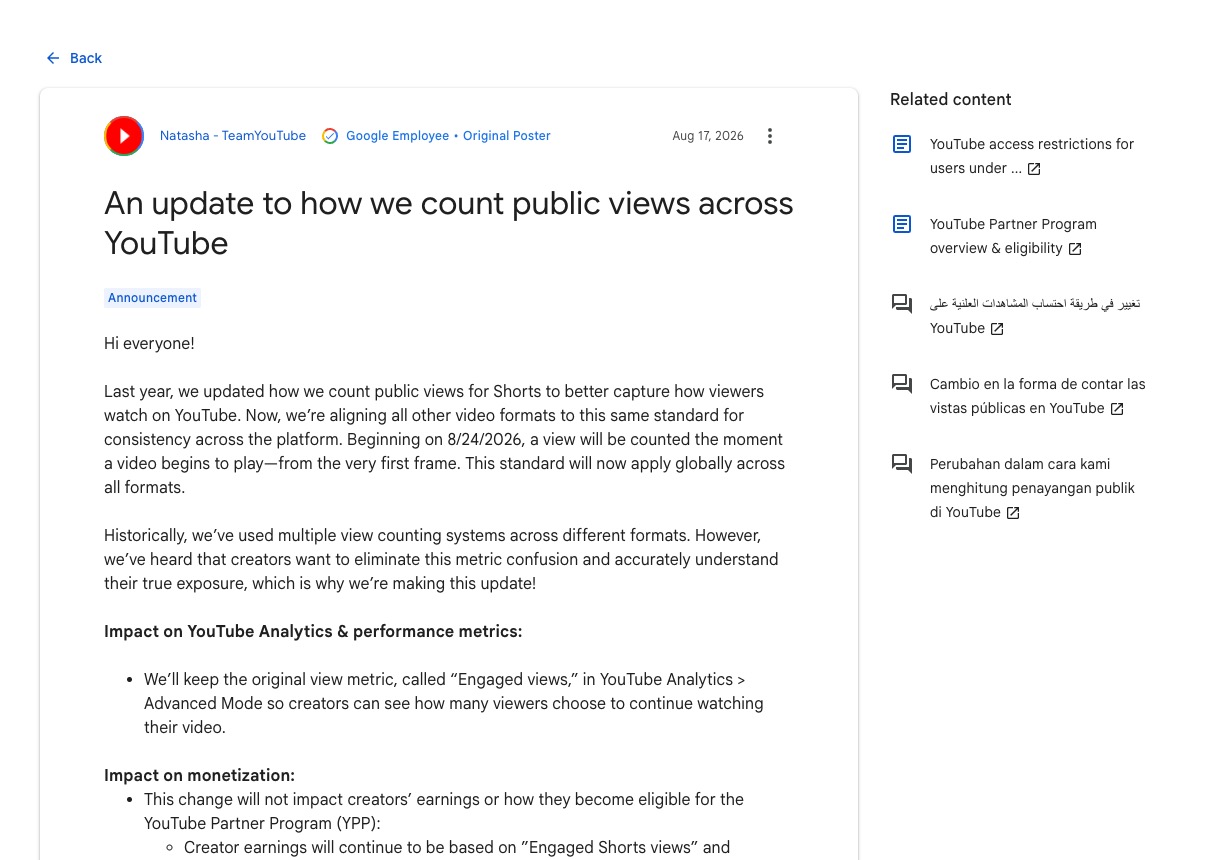
The number that shows real watching is engaged views. Find it in YouTube Analytics under Advanced Mode. Pay and Partner Program entry both use it.
Compare the two numbers on your last ten Shorts. If public views look fine and engaged views are low, plenty of people saw the Short and few stayed. That is a hook problem, and check 3 covers it. If both numbers are low, YouTube showed the Short to few people. Checks 4 to 6 cover that.
3. Check viewed versus swiped away
This is the most useful Shorts number in Studio. Open a Short’s analytics and look for “Viewed vs swiped away.” It shows the share of people who stayed when the Short appeared in their feed.
A low share means the first two seconds did not earn the watch. Three fixes work more often than any others.
- Start with the point. Cut any greeting, logo or “in this video.”
- Put the subject on screen in the first frame. A viewer should know the topic before the first word ends.
- Make the first line a claim or a question. “Your phone charger is lying to you” beats “Let’s talk about chargers.”
Shorts lost the dislike button in the 2026 player redesign. Chrome Unboxed reports that “Not interested” is now the way viewers tell YouTube they do not want a Short. A weak hook now costs you the swipe and, sometimes, that tap too.
4. Ask whether the Short is original
On October 1, YouTube started giving less Shorts reach to channels that mostly re-upload other creators’ clips. TeamYouTube’s post says those channels “will likely see less distribution within the Shorts feed.”
The Creator Insider video lists what does not count as adding value: a voiceover that describes the screen, minor edits, and bulk changes from a template.
If your channel is built on movie scenes, podcast clips or other people’s Shorts, this is the likely cause of a drop after October 1. Our guide to the Shorts originality update has a five-question check and the way back.
5. Look for the template problem
Line up your last ten Shorts. If they share one hook, one structure and one ending, viewers who saw the first have no reason to watch the tenth. YouTube ranks for each viewer, using what that viewer watched before. We think a viewer who swiped past your last three gives it little reason to show the fourth.
Sameness also puts pay at risk. The inauthentic content policy stops ads on channels that post generic, repetitive videos.
Change one thing at a time so you can see what helped. Try a new opening line first, then a new format, then a new topic inside your niche.
6. Rule out settings and restrictions
A Short at zero views for a day usually has a setting in the way. Open the Content tab in YouTube Studio and check four things.
- Visibility is Public, not Private, Unlisted or Scheduled.
- The Restrictions column is empty. A copyright claim or an age restriction limits where a Short appears.
- The audience setting is right. A Short marked “Made for kids” loses several features.
- The video is a Short. It should be vertical or square and no longer than three minutes.
Fix what you find and wait a day before judging again.
7. Check whether everyone is down
Some drops have nothing to do with you. A dip that hits many channels on the same day is not about your Short.
Views also move with the calendar. School terms and holidays change how much people watch. Compare this month with the same month last year before you compare it with last month.
A quick test: ask two creators in your niche. If all three of you fell on the same day, wait it out.
8. Shadowbans are the least likely cause
YouTube has not confirmed that shadowbans exist, and its own account points the other way. In the same interview, Beaupré told of a viewer who complained about missing a channel’s uploads. YouTube checked. The viewer had been shown those uploads 19 times and had not noticed.
His wider point was that recommendations are “pulled for each viewer” at the moment they open the app. No single switch hides a channel from everyone.
Real limits do exist, and they come with a notice. Strikes, age restrictions and monetization actions all show up in Studio. If Studio shows nothing, go back to checks 2 and 3.
What to test this week
Once you know which check fits, run a small test instead of a full rebuild.
- Pick your best idea from the last month and write three new first lines for it.
- Make all three versions. With AITuber, each version is a script edit, and it builds the images, voice and captions again.
- Post them a few days apart and compare viewed versus swiped away.
- Keep the opening style that wins and use it on your next five ideas.
YouTube is building this test into Studio. Strategist Paddy Galloway wrote on LinkedIn that creators will be able to upload three versions of a Short and let YouTube compare them on watch time. YouTube says it will roll out over the coming months.
Short on ideas? Our free YouTube video ideas finder and script generator are a quick start. OutlierKit goes further and shows which videos in your niche beat their own channel’s average.
AITuber makes the versions. It cannot tell you which idea is worth testing, and no tool can promise views.
Every 2026 change that affects Shorts reach is in our YouTube algorithm changes log.
Frequently Asked Questions
Why are my YouTube Shorts not getting views?
The most common cause is a weak first two seconds. Check viewed versus swiped away in YouTube Analytics. If most viewers swipe, fix the hook. If few people were shown the Short at all, check originality, settings and sitewide dips.
Why are my Shorts stuck at 0 views?
A Short at zero for a full day usually has a setting in the way. Check that visibility is Public and that the Restrictions column in Studio is empty. Then wait a day.
How long does it take for a Short to get views?
Give it at least three days. A 2026 Metricool study found 83% of interactions come in the first ten days, and YouTube says many videos pick up later.
Did the YouTube algorithm change for Shorts in 2026?
Yes, once. Since October 1, 2026, the Shorts feed favors original videos and gives less reach to channels that mostly re-upload other creators’ clips.
Am I shadowbanned on YouTube?
Probably not. YouTube has not confirmed that shadowbans exist, and real restrictions show a notice in Studio. Low reach almost always traces back to swipe rate or originality.
Why do my Shorts get views but no engaged views?
Public views now count every time a Short starts to play, even if the viewer swipes at once. Engaged views count people who chose to keep watching. A big gap means the hook is losing people.
Does posting more Shorts fix low views?
Not by itself. More copies of a Short that viewers swipe past will get swiped past too. Fix the hook first. Our guide on how many Shorts to post a day covers pace.
How we researched this: the view counting and originality details come from TeamYouTube’s own posts and the Creator Insider video, read on October 3, 2026. The Beaupré points come from the first ten minutes of the Creator Insider interview transcript. The Metricool figure comes from its press release, and the dislike button detail from Chrome Unboxed. The hook fixes and the order of the checks are our own judgment.