Higgsfield MCP Video Generation: Setup and Limits
Connect Higgsfield's MCP server to Claude in about a minute. What it returns, the credit limits Higgsfield does not advertise, and a full pipeline option.

Higgsfield’s MCP server connects 30+ image and video models to Claude in about a minute, and it hands back a clip of up to 15 seconds. Setup is genuinely easy, and there is no API key to paste. The part worth knowing before you subscribe is what the clip does not include, and one pricing footnote that catches people out.
Key takeaways
| Question | Short answer |
|---|---|
| Is there an official server? | Yes, hosted by Higgsfield at https://mcp.higgsfield.ai/mcp |
| Do I need an API key? | No. You sign in with your Higgsfield account |
| What does it return? | A silent clip, up to 15 seconds, up to 4K |
| Cheapest plan with MCP access | Basic, $9 a month, 120 credits |
| What it does not do | Script, voiceover, captions, editing, publishing |
What Higgsfield MCP actually is
Higgsfield MCP is a hosted bridge between your AI assistant and Higgsfield’s model catalogue. You add one URL to Claude, sign in, and Claude can then generate images and video clips inside the conversation.
MCP stands for Model Context Protocol. It is an open standard, so the same server works in Claude, OpenClaw, Hermes, and other MCP clients. We cover the wider field in our guide to the best MCP servers for AI video generation.
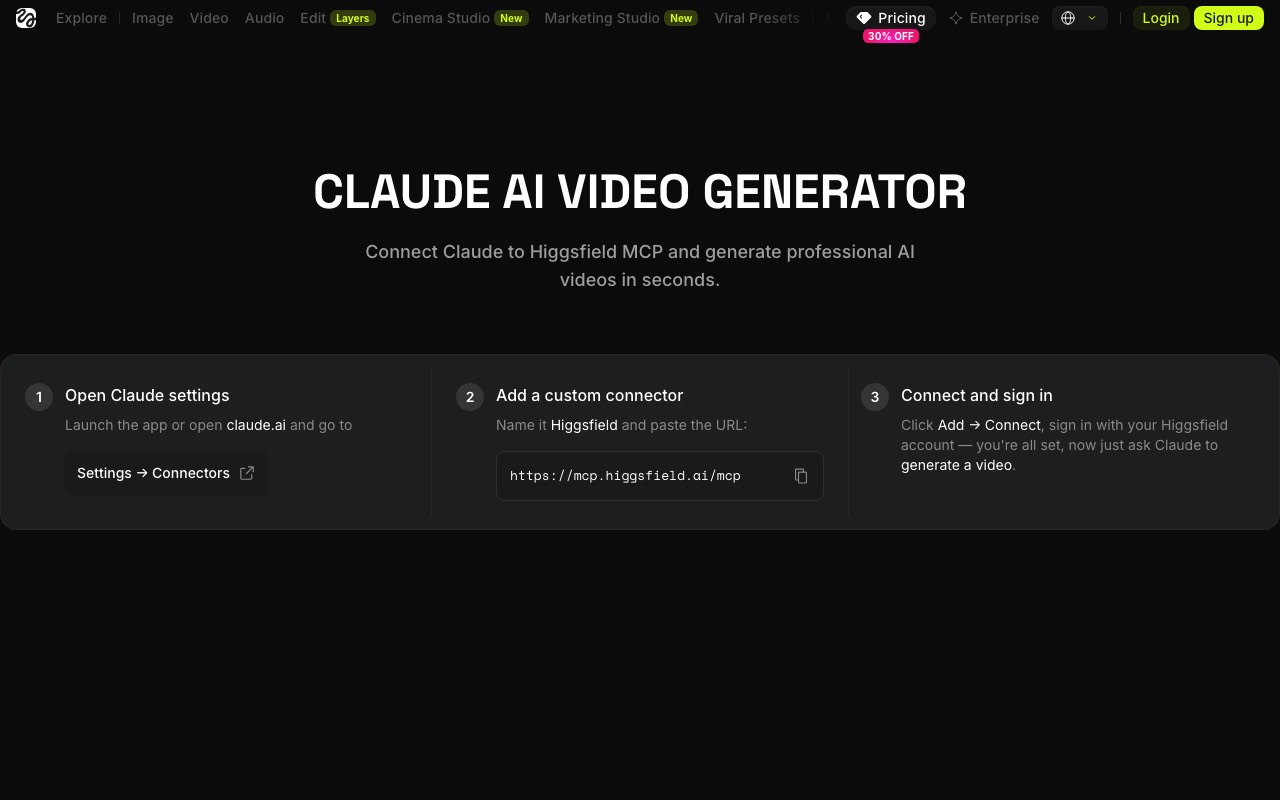
According to Higgsfield’s own MCP page, the server gives your agent 30+ models. Named ones include Soul, Cinema Studio, Flux, Seedream, Kling, Minimax Hailuo, and Veo. Your assistant picks a model for you, or you name one yourself.
How to set up Higgsfield MCP in Claude
This is the path Higgsfield recommends for Claude on the web and Claude desktop. It takes about a minute.
- Copy the connector URL:
https://mcp.higgsfield.ai/mcp - In Claude, open Customize, then Connectors.
- Add a custom connector. Name it Higgsfield and paste the URL.
- Click connect and sign in to your Higgsfield account in the browser window that opens.
- Ask Claude for an image or a clip. The first request will ask you to approve the tool.
There is no config file to edit and no key to store. Authentication runs through your Higgsfield account, so your plan credits are used automatically.
How to set up Higgsfield MCP in Claude Code
Higgsfield’s own guidance is blunt here. On its MCP page it says that if you are using Claude Code or Codex, it is better to use the CLI rather than the MCP connector.
The CLI path is three commands:
- Install it:
npm i -g @higgsfield/cli - Sign in:
higgsfield auth login, then finish in the browser it opens. - Add the companion skills:
npx skills add higgsfield-ai/skills
You can still add the hosted MCP server to Claude Code if you prefer one setup everywhere. It is the same URL, added as an HTTP transport at user or project scope. Higgsfield just gets better results from the CLI in a terminal, because the CLI ships with skills that the bare connector does not.
Is there an official Higgsfield MCP server?
Yes. The server at https://mcp.higgsfield.ai/mcp is run by Higgsfield itself, and the setup instructions come from higgsfield.ai directly.
This matters because community wrappers exist on GitHub, and third-party guide sites use names that look official. A community wrapper is someone else’s code calling the Higgsfield API with your key. It can break when the API changes, and you are trusting a stranger’s build. Use the hosted URL from Higgsfield’s own site unless you have a specific reason not to.
Higgsfield MCP and the Higgsfield API are not the same thing
Search results mix these two up constantly, so it is worth separating them.
The MCP server needs no API key. You sign in with your account, and your plan credits are spent as you generate. This is the one you want for chatting with Claude.
The developer API is a separate product with its own keys and Bearer token auth, meant for code you write yourself. If you are building an app rather than chatting, that is the path. Our roundup of the best AI video APIs covers how that category compares.
If a guide tells you to paste an API key into Claude for Higgsfield MCP, it is describing a community wrapper, not the official connector.
What you get back, and what you do not
This is the part to be honest about. Higgsfield MCP is a model wrapper. It does one step of a video job very well.
A publishable video takes six steps. Higgsfield covers one of them.
You get: a silent clip, up to 15 seconds, up to 4K, in the aspect ratio you asked for. You can also generate images, train a consistent character with Soul, and browse your generation history.
You do not get: a written script, a voiceover, captions, an edit that stitches clips together, or a publish step to YouTube or TikTok.
For a single hero shot in an ad, that is exactly right. For a channel that posts three times a week, one clip is a small part of the work.
The limits Higgsfield does not put in the headline
Three things are worth knowing before you pick a plan.
Unlimited models do not work through MCP. This is the big one. Higgsfield’s pricing page carries a footnote stating that unlimited models and free generations on plans are accessible only via higgsfield.ai, and are not accessible on MCP, CLI, Canvas, or Supercomputer. So the “7-day unlimited Kling 3.0” style perks that make the plans look generous do not apply in Claude. Through MCP you are spending metered credits.
15 seconds is a hard ceiling. Every generation caps there. A 60 second video means four or more separate generations, then an edit to join them.
Credits move with model and resolution. A 4K Seedance clip costs more than a fast preview. Nothing is billed per video, so your real cost depends on how many retries a shot takes.
Higgsfield MCP pricing
MCP access starts on the Basic plan. Prices below were read off Higgsfield’s own pricing page on 21 August 2026, with an annual promotion running.
| Plan | Monthly | Billed yearly | Credits a month | Seedance 2.0 clips |
|---|---|---|---|---|
| Basic | $9 | $9 | 120 (fixed) | About 7, Fast models only |
| Pro | $29 | $23 | 600 | About 27 |
| Max | $79 | $59 | 1,800 and up | About 80 |
There is also a $3 one-time pass with 40 credits and two days of unlimited Soul 2.0, which is a fair way to test the connector before subscribing.
A Seedance 2.0 clip works out at roughly 22 credits. That puts a single 15 second clip at about $1.29 on Basic, $0.85 on Pro, and $0.74 on Max, before retries.
Higgsfield MCP vs AITuber MCP
Both are hosted servers. Both sign in with your account instead of an API key. They differ on what comes back.
| Higgsfield MCP | AITuber MCP | |
|---|---|---|
| Returns | Silent clip, up to 15s | Finished MP4 with voice and captions |
| Script writing | No | Yes |
| Voiceover | No | Yes, 1,300+ voices |
| Captions | No | Yes, word synced |
| Length | 15 seconds max | Minutes |
| Publishing | No | YouTube, TikTok, Instagram, Facebook, Threads, X |
| Model choice | 30+ models, you can name one | Handled for you |
| Free to try | $3 pass, 40 credits | 100 free credits, no card |
| Cheapest plan | $9 a month | $39 a month |
The honest read: Higgsfield wins on cinematic quality for one shot, and on model choice. AITuber wins when the output needs to be something you can post without opening an editor.
They also stack. Some people use Higgsfield for a hero shot and a full pipeline for the weekly volume.
Who should use Higgsfield MCP
Use it if you want one striking clip fast, you care which model runs, or you are making ads and hero shots where the edit is already your job.
Skip it if you are publishing on a schedule, you need narration and captions every time, or you want the video to land on your channel without another tool in the loop.
Use both if you want Higgsfield’s look for the opening shot and a pipeline for everything else. Nothing stops you connecting two servers to the same assistant. Setting up AITuber in Claude takes the same minute.
Frequently Asked Questions
Basics
What is Higgsfield MCP?
Higgsfield MCP is a hosted Model Context Protocol server run by Higgsfield. It lets an AI assistant like Claude generate images and video clips from Higgsfield’s 30+ models inside a normal conversation. The connector URL is https://mcp.higgsfield.ai/mcp.
Is Higgsfield MCP official?
Yes. Higgsfield hosts the server itself and publishes the setup steps on higgsfield.ai. Community wrappers exist on GitHub, but they are separate projects that call the Higgsfield API with your own key.
Which AI tools can connect to it?
Higgsfield lists Claude on the web, Claude Code, OpenClaw, Hermes Agent, and NemoClaw. Any MCP-compatible client can connect, because MCP is an open standard.
Setup
Do I need an API key for Higgsfield MCP?
No. You add the server URL in your assistant’s connector settings and sign in with your Higgsfield account. The developer API is a separate product that does use keys.
How do I use Higgsfield MCP with Claude Code?
Higgsfield recommends its CLI instead of the connector for Claude Code. Install it with npm i -g @higgsfield/cli, sign in with higgsfield auth login, then add the skills with npx skills add higgsfield-ai/skills.
How long does setup take?
About a minute for the Claude connector. You copy one URL, paste it into Customize then Connectors, and sign in.
Cost and limits
How long can Higgsfield MCP videos be?
Up to 15 seconds per generation. Longer videos need several generations joined in an editor.
Do the unlimited generations on my plan work in Claude?
No. Higgsfield’s pricing page states that unlimited models and free generations are available only on higgsfield.ai, not through MCP, CLI, Canvas, or Supercomputer. Through MCP you spend metered credits.
What is the cheapest way to try it?
The $3 one-time pass includes 40 credits. That is enough for a couple of clips and costs less than a month of Basic.
Comparisons
Does Higgsfield MCP add voiceover and captions?
No. It returns a silent clip. Script, narration, captions, and the edit stay with you. A full pipeline server like AITuber returns those steps finished.
Higgsfield MCP or the Higgsfield API?
Use the MCP server if you are working in a chat window and want zero setup. Use the API if you are writing code and need programmatic control.
How we researched this: setup steps, model lists, limits, and pricing come from Higgsfield’s own MCP, CLI, and pricing pages, read in the browser on 21 August 2026, plus Anthropic’s published MCP figures. Credit-per-clip costs are calculated from the credit allowances and clip estimates Higgsfield publishes on its pricing page. AITuber is a product we build, so we have flagged every comparison and kept the Higgsfield details accurate and current. Prices, promotions, and model line-ups change often; check higgsfield.ai for the latest.