Can ChatGPT Make Videos? Yes, Full Videos With a Plugin
ChatGPT has no video model since OpenAI shut down Sora. See what still works, the 3 kinds of video plugins, and how to get a finished MP4 in the chat.

Key takeaways
- ChatGPT can write a script, plan the scenes, and make images. It cannot render a video file.
- OpenAI announced the end of Sora on March 24, 2026. The Videos API and the
sora-2models went offline on September 24, 2026. - ChatGPT video plugins come in 3 kinds: clip makers, editors, and finished-video makers.
- AITuber is a finished-video maker. It works on the free ChatGPT plan: add one URL on the Plugins page, sign in, and type @AITuber.
- The same account works in Claude, in other MCP clients, and in a normal browser.
What Happened to Sora?
Sora was OpenAI’s video model. In 2025 you could make short clips with it in its own app, and developers could call it through the API. In 2026 OpenAI closed it in steps.
| Date | What happened | Source |
|---|---|---|
| March 24, 2026 | OpenAI said it will shut down the Sora app. Disney dropped its planned $1 billion investment. | Reuters, CNBC |
| March 24, 2026 | OpenAI told developers that the Videos API would go offline in six months. | OpenAI deprecations |
| April 26, 2026 | The Sora web and mobile apps closed. | OpenAI Help Center |
| September 24, 2026 | The Videos API, sora-2, and sora-2-pro were removed. The replacement column is empty. | OpenAI deprecations |
So when you ask ChatGPT for a video today, it has no video model to call. It gives you a script, an image, or a list of tools instead. For the full story and the tools people moved to, read Sora is dead: the best AI video alternatives.
What ChatGPT Can Still Do for a Video
ChatGPT is still useful for most of the work around a video. It can:
- Write the script for a Short or a 10-minute explainer
- Plan the scenes with a shot list and the text for each scene
- Write prompts for an image or video model
- Make still images for a thumbnail or a single scene
- Write the title, description, and tags for the upload
What it cannot do alone is the part that takes the most time: the voiceover, the visuals for every scene, the captions that match the words, and the final MP4. A plugin does that part.
The 3 Kinds of ChatGPT Video Plugins
ChatGPT plugins connect to outside tools through MCP (Model Context Protocol). Video plugins do three different jobs. Pick the one that matches the result you want.
| Kind | What you get | Examples | Pick it when |
|---|---|---|---|
| Clip maker | A short AI clip from a prompt or an image, usually seconds long | Runway, Atlas Cloud (its clips run 4 to 30 seconds) | You need one shot for an edit you will finish somewhere else |
| Editor | Your own footage, cut and changed by prompt | invideo, ChatCut | You already filmed the video |
| Finished-video maker | A complete video: script, voice, visuals, captions, MP4 | AITuber, and Synthesia for avatar presenters | You want a video you can post |
A clip maker gives you one shot. A finished-video maker gives you a video you can post.
How to Make a Video in ChatGPT With AITuber
The AITuber plugin is hosted at https://mcp.aituber.app. You install nothing and you need no API key. It works on the free ChatGPT plan: the screenshots below come from a free account.
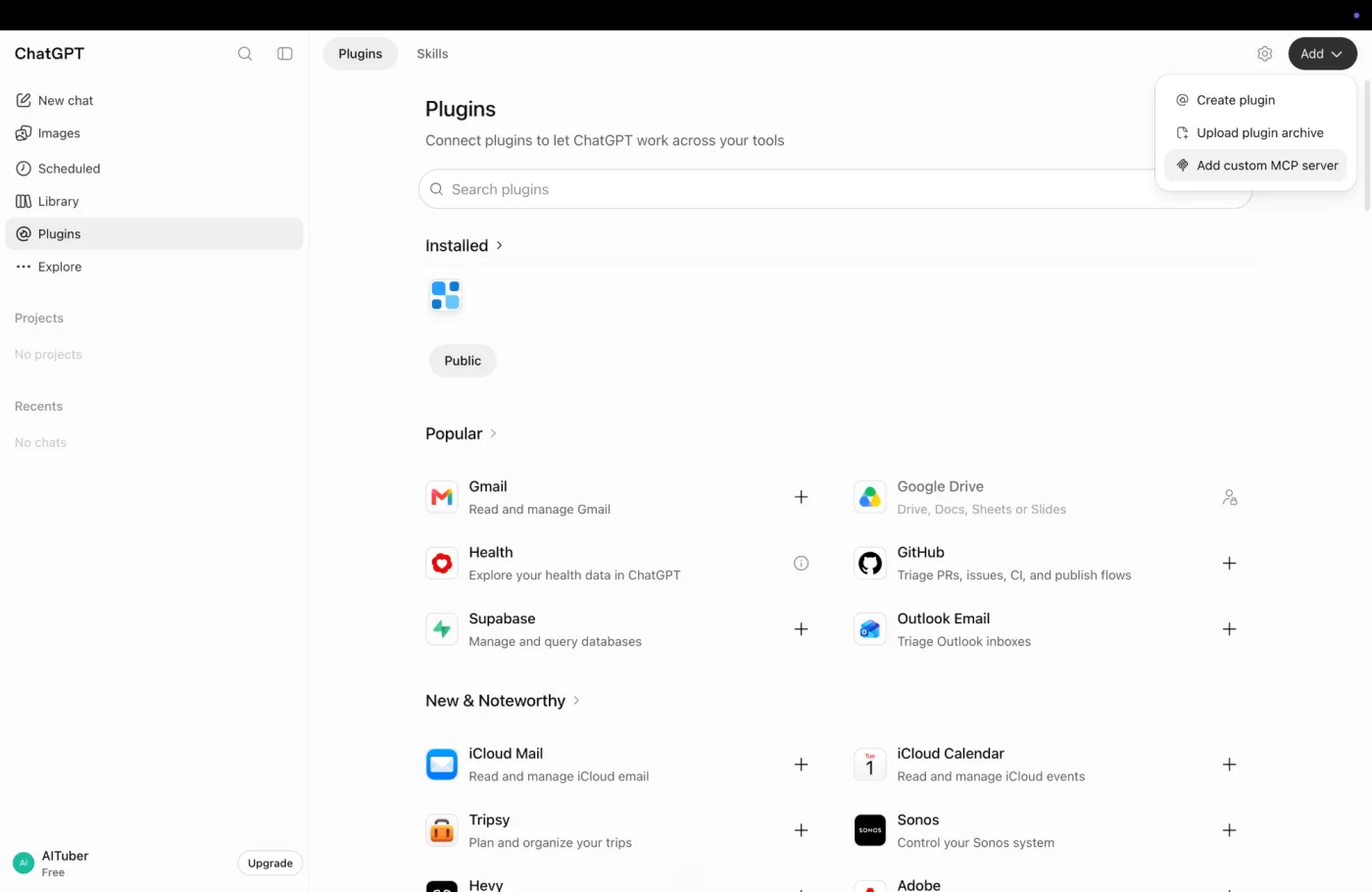
1. Open the Plugins page. In ChatGPT on the web, select Plugins in the sidebar. Select Add at the top right, then Add custom MCP server.
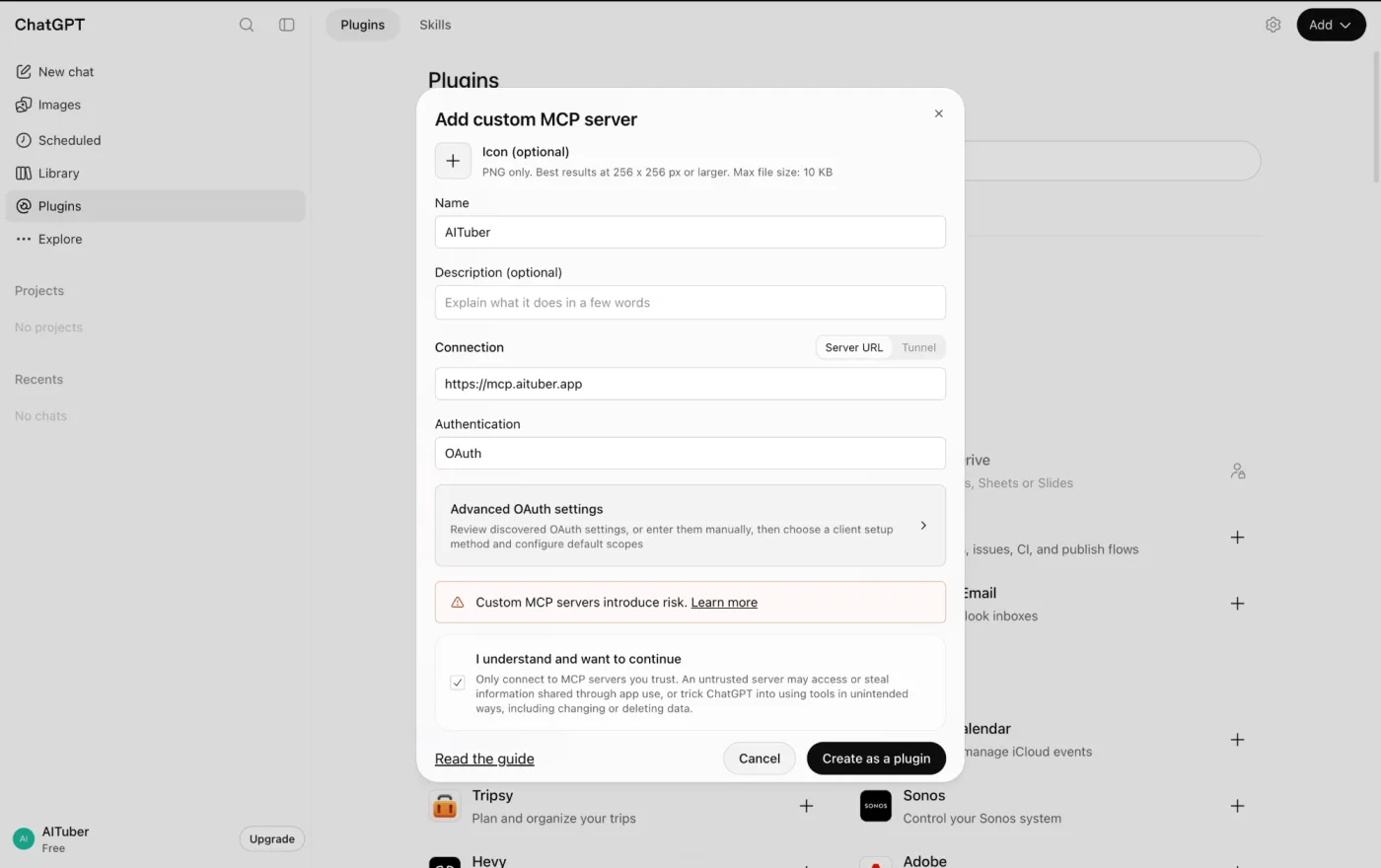
2. Fill in the form. Type AITuber as the name. Under Connection, keep Server URL and paste https://mcp.aituber.app. For Authentication, choose OAuth. ChatGPT shows a risk warning for every custom MCP server, not only this one. Select I understand and want to continue, then Create as a plugin.
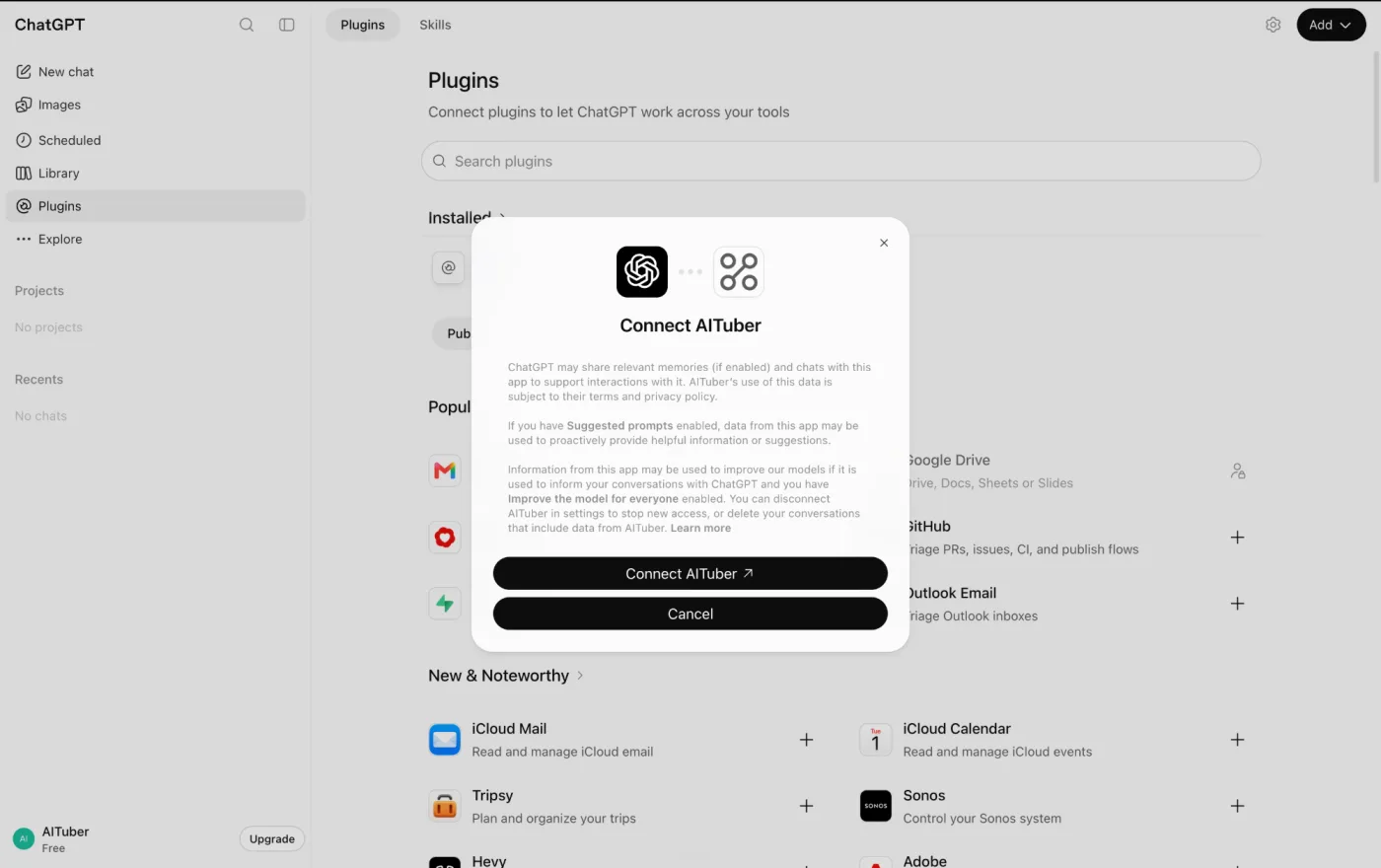
3. Connect your account. Select Connect AITuber. A new tab opens. Sign in, or create a free AITuber account.
4. Ask for the video. In any chat, type @AITuber, then your request:
@AITuber Write a 45-second script about why the sky is blue, then make it into a vertical video with captions and give me the MP4.
The ChatGPT setup page has the same steps with a copy button for the URL. If you use ChatGPT at work or school and you do not see Add custom MCP server, your admin turned it off. You can still make the same video in Claude or in your browser at aituber.app.
Here is what happens next:
- The script comes first. Read it in the chat and ask for changes before anything renders. Changes to the words cost nothing.
- The video generates. AITuber picks a voice and makes visuals for each scene. You can ask for AI images, AI video clips, or stock footage.
- You get the MP4. ChatGPT exports the video and gives you the download link. The export can take a minute for a longer video. You can also ask ChatGPT to post it to a connected channel.
New AITuber accounts get 100 free credits with no card. The cost of a video shows before it generates.
3 Prompts to Copy
Each prompt works as written. Change the topic and keep the structure.
A YouTube Short
Make a 50-second vertical video about 5 facts about octopuses. Strong hook in the first line, captions on, energetic female voice. Give me the MP4.
A long explainer
Write a 10-minute script that explains how credit scores work, in 6 chapters. Then make it a 16:9 video with stock footage and a calm male voice.
A music video
Write a short pop song about summer in Tokyo, then make a music video for it with synced lyrics.
AITuber also makes AI avatar videos, where a presenter speaks your script, and music videos from a song you write or upload. Ask for either one in the same chat.
Can ChatGPT Post the Video for You?
Yes, through the plugin. Connect your channels in AITuber once. Then ask ChatGPT to list them and publish the finished video to YouTube, TikTok, Instagram, Facebook, Threads, or X. ChatGPT asks you before it runs the action.
Bonus: let it run without a chat. A plugin needs you to type a request. If you want videos on a schedule, use AITuber Autopilot. It picks the topic, writes a new script, makes the video, and publishes it to your connected channels on your schedule. You can keep publishing off and check each video first.
No ChatGPT Plugin? Use Claude or the Browser
The plugin is one way in. The same account and the same credits work in three other places:
- In the browser: go to aituber.app and sign in. You install nothing, and it works on a phone. Paste a script into script to video and choose scenes or an avatar presenter.
- In Claude: add the same URL as a custom connector. See how to make videos in Claude.
- In other MCP clients: Codex, Cursor, and others connect through the AITuber MCP server.
One generation can make up to 20 minutes of finished video. Many video tools stop at 30 to 60 seconds for each generation.
Frequently Asked Questions
Can ChatGPT make videos?
Not by itself. ChatGPT has no video model since OpenAI removed Sora and its Videos API on September 24, 2026. It can write the script and make images. To get a finished video, add a video plugin such as AITuber, which returns an MP4 with a voice, visuals, and captions.
Does ChatGPT Plus still include Sora?
No. OpenAI shut down the Sora app in 2026 and removed the Sora models from the API on September 24, 2026. No ChatGPT plan includes Sora video now.
Can ChatGPT make videos for free?
ChatGPT does not make video files on any plan. But you can add the AITuber plugin on the free ChatGPT plan, and a new AITuber account gets 100 free credits with no card. So you can make your first videos without paying anything.
Can ChatGPT make a video from photos?
Not by itself. A clip-maker plugin can turn one photo into a short clip. AITuber can use your photo as a reusable element, so the same person or product appears in every scene of a full video.
Can ChatGPT make videos with sound?
With a plugin, yes. An AITuber video has an AI voiceover, captions that match the words, and optional background music.
How long can a ChatGPT video be?
That depends on the plugin. Clip makers usually return a few seconds. AITuber makes up to 20 minutes of finished video in one generation.
Can ChatGPT edit a video I already have?
Use an editor plugin for that, such as invideo or ChatCut. AITuber makes new videos from a script or an idea. It does not cut your own footage.
Is there an MCP server for AI video generation?
Yes. The AITuber MCP server at https://mcp.aituber.app works in ChatGPT, Claude, Codex, Cursor, and other MCP clients. It writes the script, makes the video, exports the MP4, and can publish it.
Can AI run my YouTube channel for me?
AITuber Autopilot can. It picks topics, writes scripts, makes the videos, and publishes them to your connected channels on a schedule. You can keep publishing off and approve each video.